<?xml version="1.0" encoding="UTF-8" ?>
<feed xml:lang="ja" xmlns="http://www.w3.org/2005/Atom" xmlns:dc="http://purl.org/dc/elements/1.1/" xmlns:thr="http://purl.org/syndication/thread/1.0">
  <title type="text">白兎のライブラリ</title>
  <subtitle type="html">個人用の備忘録的なブログです・ω・</subtitle>
  <link rel="self" type="application/atom+xml" href="http://libraryofhakuto.blog.shinobi.jp/atom"/>
  <link rel="alternate" type="text/html" href="http://libraryofhakuto.blog.shinobi.jp/"/>
  <updated>2013-06-23T14:38:56+09:00</updated>
  <author><name>白兎（ハクト、HAKUTO）</name></author>
  <generator uri="//www.ninja.co.jp/blog/" version="0.9">忍者ブログ</generator>
  <atom10:link xmlns:atom10="http://www.w3.org/2005/Atom" rel="hub" href="http://pubsubhubbub.appspot.com/" />
  <entry>
    <id>libraryofhakuto.blog.shinobi.jp://entry/94</id>
    <link rel="alternate" type="text/html" href="http://libraryofhakuto.blog.shinobi.jp/%E9%85%8D%E5%B8%83%E7%89%A9/%E3%83%AA%E3%83%B3%E3%82%AF%E5%88%87%E3%82%8C%E3%81%97%E3%81%9F%E3%83%95%E3%83%83%E3%83%86%E3%83%BC%E3%82%B8%E3%81%AE%E3%83%95%E3%82%A1%E3%82%A4%E3%83%AB%E3%83%91%E3%82%B9%E3%82%92%E7%BD%AE%E6%8F%9B%E3%81%99%E3%82%8B%E3%82%B9%E3%82%AF%E3%83%AA%E3%83%97%E3%83%88" />
    <published>2016-07-22T20:28:19+09:00</published> 
    <updated>2016-07-22T20:28:19+09:00</updated> 
    <category term="配布物" label="配布物" />
    <title>リンク切れしたフッテージのファイルパスを置換するスクリプト</title>
    <content mode="escaped" type="text/html" xml:lang="utf-8"> 
      <![CDATA[またまたScript勉強過程の産物です。・&omega;・<br />
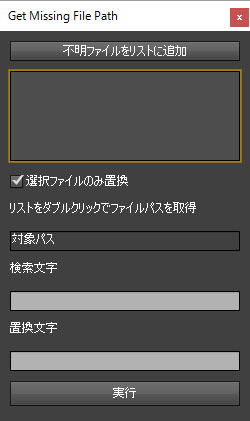
リンクが切れてしまったファイルパスを取得して置換するスクリプトです。<br />
<br />
<a title="" href="http://ae-users.com/jp/author/bry-ful/" target="_blank">bryful</a>さんのソースを参考にしながらproxyにも対応させてみました。<br />
この方のソースは綺麗で分かりやすいので憧れますね。（＞&forall;＜）<br />
<br />
<a title="" href="//libraryofhakuto.blog.shinobi.jp/File/Sample10.jpg" target="_blank"><img alt="" src="//libraryofhakuto.blog.shinobi.jp/Img/1469186092/" /></a>&nbsp;<br />
<br />
<a title="" href="http://libraryofhakuto.blog.shinobi.jp/distribution%20file" target="_self">紹介ページ</a>]]> 
    </content>
    <author>
            <name>白兎（ハクト、HAKUTO）</name>
        </author>
  </entry>
  <entry>
    <id>libraryofhakuto.blog.shinobi.jp://entry/93</id>
    <link rel="alternate" type="text/html" href="http://libraryofhakuto.blog.shinobi.jp/3dcg/uv%E6%95%B0%E5%80%A4%E6%93%8D%E4%BD%9C%E3%81%8C%E7%84%A1%E3%81%84%E6%99%82%E3%81%AE%E5%AF%BE%E5%87%A6" />
    <published>2016-07-01T20:22:29+09:00</published> 
    <updated>2016-07-01T20:22:29+09:00</updated> 
    <category term="3DCG" label="3DCG" />
    <title>UV数値操作が無い時の対処</title>
    <content mode="escaped" type="text/html" xml:lang="utf-8"> 
      <![CDATA[UVの数値に直接操作できるメタセコイアのプラグイン「UV数値操作」の配布元が既に<br />
閉鎖されていたので代用のプラグインを探すことにしました。（主にUV左右反転させたかったので）<br />
<br />
<a title="" href="http://www.siobi.info/program/mq-pluginlink.htm" target="_blank">http://www.siobi.info/program/mq-pluginlink.htm</a><br />
<br />
今回は上記のプラグイン紹介サイトから「数値UVeditor(仮)」をダウンロードしました。<br />
解凍してreadmeに従いインストールします。<br />
<br />
<a title="" href="//libraryofhakuto.blog.shinobi.jp/File/CG_SS2.jpg" target="_blank"><img alt="" src="//libraryofhakuto.blog.shinobi.jp/Img/1467371667/" /></a> <br />
<br />
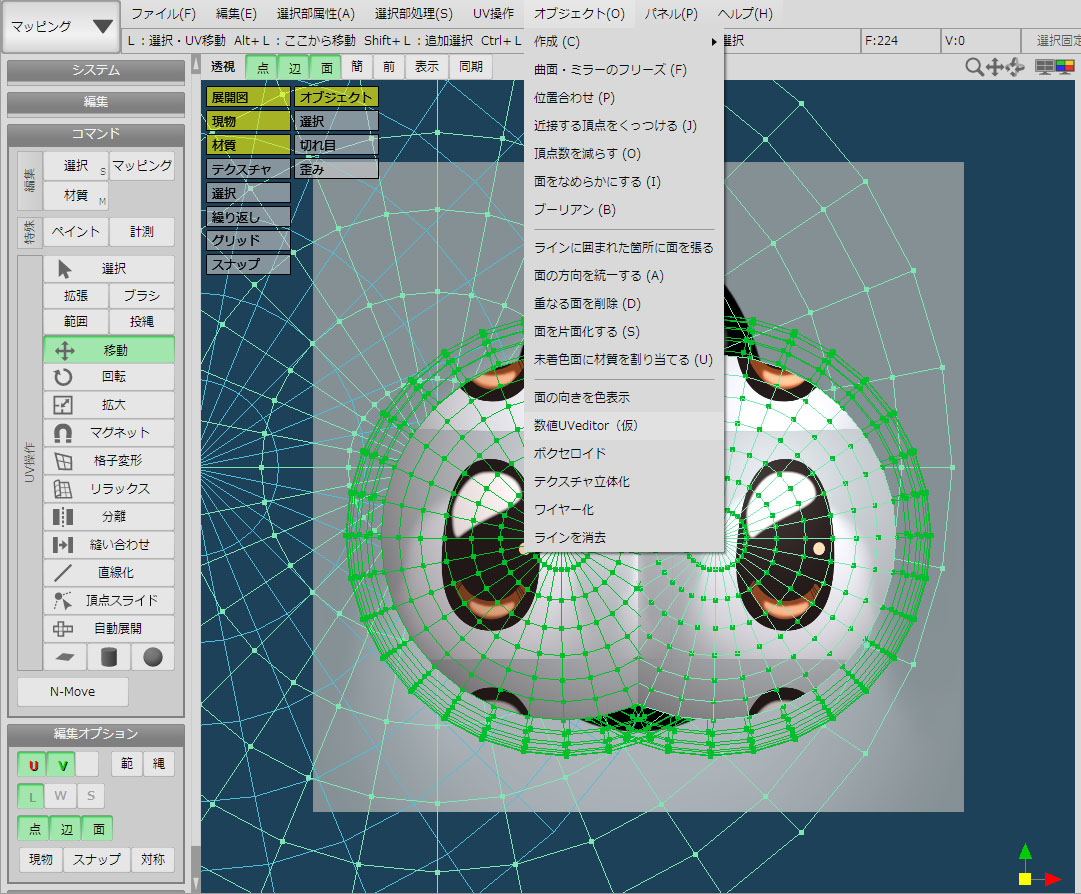
すると上図のようにメニュー＞オブジェクトに新しく追加されていますので選択し<br />
プラグインが起動します。<br />
<br />
<a title="" href="//libraryofhakuto.blog.shinobi.jp/File/CG_SS3.jpg" target="_blank"><img alt="" src="//libraryofhakuto.blog.shinobi.jp/Img/1467371817/" /></a> <br />
<br />
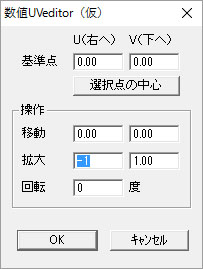
単純にUVを左右反転させたいだけなら「拡大」の数値を-1にしてあげることで<br />
反転できます。<br />
<br />
標準機能でもUV反転機能はありますが<br />
選択個所のみ反転させたい場合など融通が利かないときに<br />
このプラグインが重宝します・&omega;・]]> 
    </content>
    <author>
            <name>白兎（ハクト、HAKUTO）</name>
        </author>
  </entry>
  <entry>
    <id>libraryofhakuto.blog.shinobi.jp://entry/92</id>
    <link rel="alternate" type="text/html" href="http://libraryofhakuto.blog.shinobi.jp/%E9%9B%91%E8%A8%98/3dcg%E5%A7%8B%E3%82%81%E3%81%BE%E3%81%97%E3%81%9F%EF%BC%81" />
    <published>2016-07-01T19:42:27+09:00</published> 
    <updated>2016-07-01T19:42:27+09:00</updated> 
    <category term="雑記" label="雑記" />
    <title>3DCG始めました！</title>
    <content mode="escaped" type="text/html" xml:lang="utf-8"> 
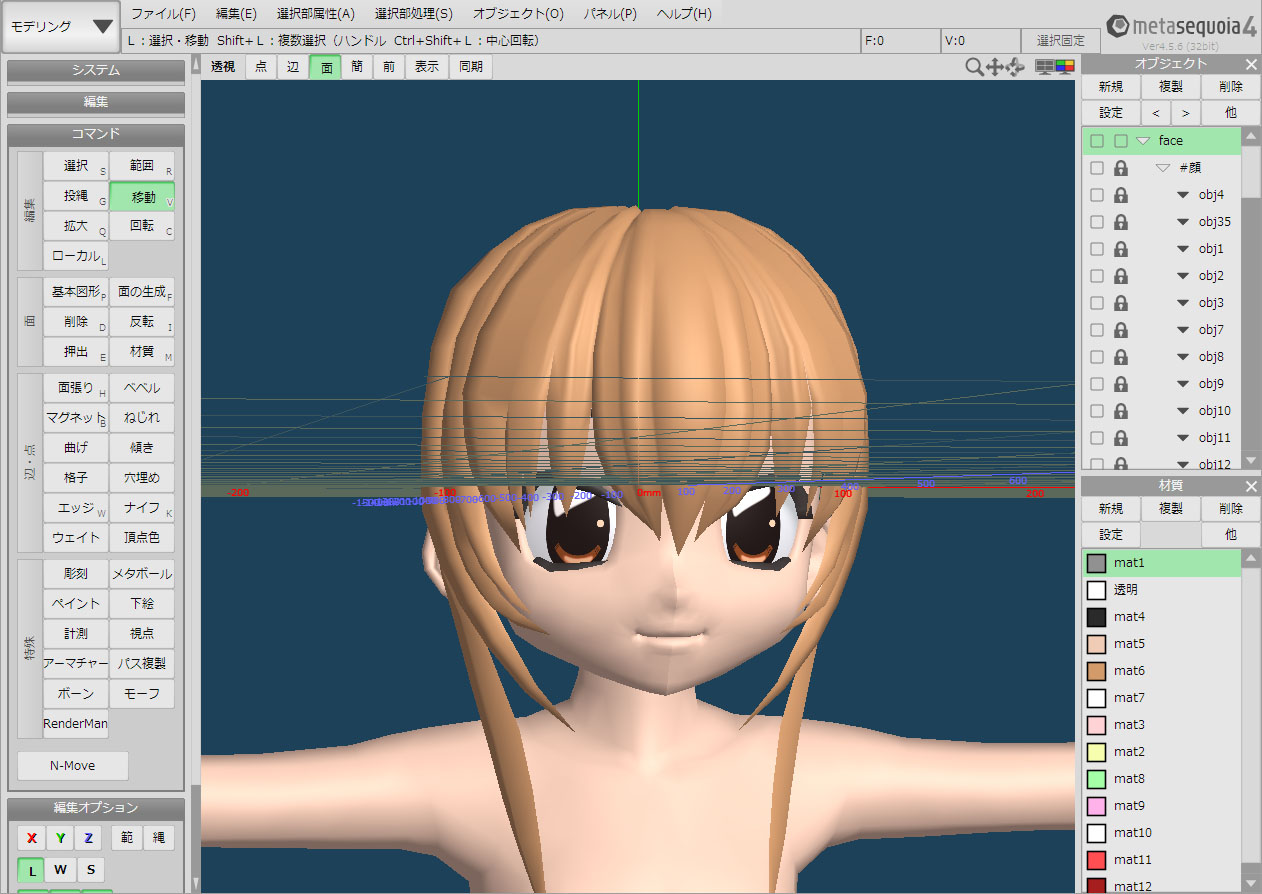
      <![CDATA[長らく、やろうやろうと思っていた3DCGを始めました。<br />
<br />
いろいろソフトはありますが<br />
まずはメタセコイアで入門してみる事にしました。<br />
<br />
<a title="" href="//libraryofhakuto.blog.shinobi.jp/File/CG_SS1.jpg" target="_blank"><img alt="" src="//libraryofhakuto.blog.shinobi.jp/Img/1467369137/" /></a> <br />
<br />
最初、3Dの専門用語を覚えるだけで頭がいっぱいになってしまいました＠ｑ＠；<br />
そしてモデリングが大変根気のいる作業ということに気づきましたｗ<br />
イラストでも何にでも言えることですが一朝一夕ではものになりませんｗｗ<br />
慣れるまではいろいろ試行錯誤していきたいとおもいます・&omega;・]]> 
    </content>
    <author>
            <name>白兎（ハクト、HAKUTO）</name>
        </author>
  </entry>
  <entry>
    <id>libraryofhakuto.blog.shinobi.jp://entry/91</id>
    <link rel="alternate" type="text/html" href="http://libraryofhakuto.blog.shinobi.jp/%E9%9B%91%E8%A8%98/wnidows10%E3%81%AB%E5%BC%B7%E5%88%B6%E3%82%A2%E3%83%83%E3%83%97%E3%82%B0%E3%83%AC%E3%83%BC%E3%83%89%E3%81%95%E3%82%8C%E3%81%BE%E3%81%97%E3%81%9F" />
    <published>2016-06-04T20:08:20+09:00</published> 
    <updated>2016-06-04T20:08:20+09:00</updated> 
    <category term="雑記" label="雑記" />
    <title>Windows10に強制アップグレードされました</title>
    <content mode="escaped" type="text/html" xml:lang="utf-8"> 
      <![CDATA[最近話題になっているwin10アップグレードの本気を、味わうこととなりました；<br />
<br />
いつものごとくアップグレードのポップアップをXで消していたのですが<br />
数分後、急に使用していたソフトが強制終了して「？！」と思い<br />
立て続けにシャットダウン画面に切り替わる始末・・・。<br />
よく見ると「Windows10の更新を構成しています」・・・なん・・だと・・！？<br />
ウチのWindows7は、こうしてやられましたｗ<br />
<br />
これも時代の流れかと受け入れ、10に慣れていこうかと思います(&acute;・&omega;・`)<br />
<br />
<a title="" href="//libraryofhakuto.blog.shinobi.jp/File/129196c5.jpeg" target="_blank"><img alt="" src="//libraryofhakuto.blog.shinobi.jp/Img/1465038491/" /></a>]]> 
    </content>
    <author>
            <name>白兎（ハクト、HAKUTO）</name>
        </author>
  </entry>
  <entry>
    <id>libraryofhakuto.blog.shinobi.jp://entry/90</id>
    <link rel="alternate" type="text/html" href="http://libraryofhakuto.blog.shinobi.jp/after%20effects%20tips/%E7%84%A1%E5%84%9F%E3%83%97%E3%83%A9%E3%82%B0%E3%82%A4%E3%83%B3%E3%80%8Csaber%E3%80%8D%E3%82%92%E4%BD%BF%E3%81%A3%E3%81%A6%E3%81%BF%E3%81%9F" />
    <published>2016-04-24T19:34:55+09:00</published> 
    <updated>2016-04-24T19:34:55+09:00</updated> 
    <category term="After Effects tips" label="After Effects tips" />
    <title>無償プラグイン「SABER」を使ってみた</title>
    <content mode="escaped" type="text/html" xml:lang="utf-8"> 
      <![CDATA[<iframe width="640" height="360" src="https://player.vimeo.com/video/163916521" frameborder="0" webkitallowfullscreen="" mozallowfullscreen="" allowfullscreen=""></iframe><br />
<p><a href="https://vimeo.com/163916521">Free PlugIn SABER</a> from <a href="https://vimeo.com/user38125241">Hakuto</a> on <a href="https://vimeo.com">Vimeo</a>.</p><br />
<br />
<iframe width="400" height="225" src="http://www.youtube.com/embed/1Ko--QXMLBY" frameborder="0" allowfullscreen=""></iframe><br />
<br />
こんなプラグインを待っていた！<br />
<br />
VIDEO COPILOTから配布されているプラグイン「SABER」<br />
のチュートリアル動画を見て作ってみました。<br />
<br />
描画系プラグインでしかも無料！<br />
なによりクール！<br />
<br />
Particularの代用も出来そうな感じもします＾＾<br />
<br />
これを活かしきれる動画を作れるように精進したいものです・&omega;・]]> 
    </content>
    <author>
            <name>白兎（ハクト、HAKUTO）</name>
        </author>
  </entry>
  <entry>
    <id>libraryofhakuto.blog.shinobi.jp://entry/89</id>
    <link rel="alternate" type="text/html" href="http://libraryofhakuto.blog.shinobi.jp/after%20effects%20tips/%E3%82%A8%E3%82%AF%E3%82%B9%E3%83%97%E3%83%AC%E3%83%83%E3%82%B7%E3%83%A7%E3%83%B3%E6%B4%BB%E7%94%A8%E4%BE%8B" />
    <published>2016-03-19T20:57:00+09:00</published> 
    <updated>2016-03-19T20:57:00+09:00</updated> 
    <category term="After Effects tips" label="After Effects tips" />
    <title>エクスプレッション活用例</title>
    <content mode="escaped" type="text/html" xml:lang="utf-8"> 
      <![CDATA[<a title="" href="//libraryofhakuto.blog.shinobi.jp/File/Sample-Line.gif" target="_blank"><img alt="" src="//libraryofhakuto.blog.shinobi.jp/Img/1458388416/" /></a> <br />
<br />
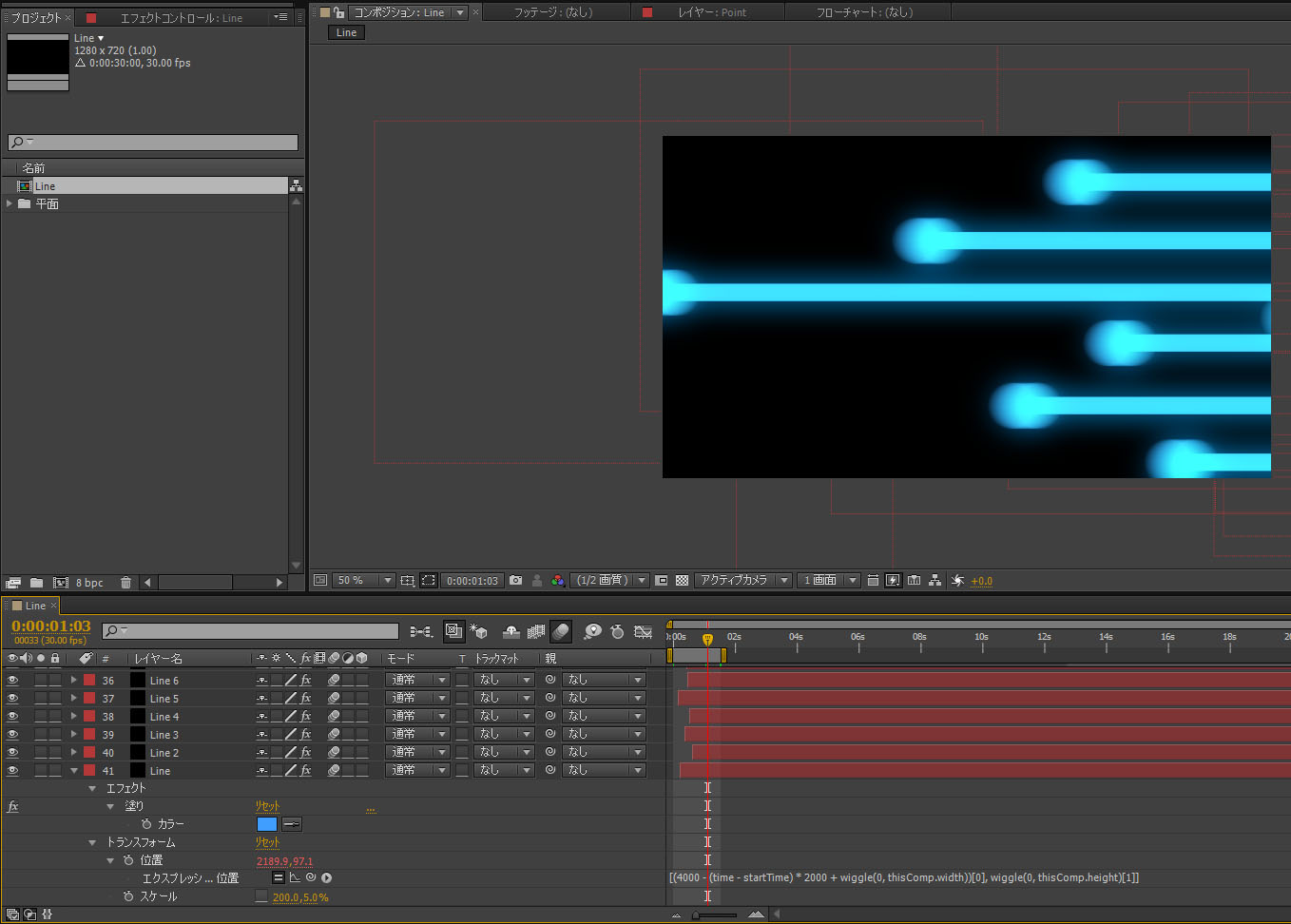
エクスプレッションで手抜kry(・・・もとい効率化を目指したいと思い記載します・&omega;・<br />
<br />
単純な右から左に移動するアニメーションを作成する時に<br />
位置プロパティにキーフレームを打ちますが<br />
大量になるとキーフレームの調整は難儀なものです・・；<br />
<br />
なので自分の場合は始めに目安となる複数の動き（規則性の無い）を"wiggle"を使い<br />
複製(Ctrl + D)して確認、微調整しています。<br />
<br />
例<br />
<br />
位置プロパティ<br />
<br />
[(4000 - (time - startTime) * 2000 + wiggle(0, thisComp.width))[0], wiggle(0, thisComp.height)[1]]<br />
<br />
この時"time"だけではレイヤーの開始位置を変えたときに意図しない結果(通り過ぎてしまう)になるので<br />
"startTime"を引いてあげるとレイヤー開始からスタートします。<br />
※"startTime"はレイヤー開始時間のことらしいです・&omega;・<br />
<br />
数値を微調整しつつ複製、削除を繰り返します。<br />
<br />
スライダ制御など別レイヤーで一括管理するとなお良いかとおもいます・&omega;・<br />
<br />
あくまで個人的見解と偏見に基づくものなので<br />
あまりお気になさらぬよう＝&omega;＝<br />
<br />
<a title="" href="//libraryofhakuto.blog.shinobi.jp/File/4ce215ae.jpeg" target="_blank"><img alt="" src="//libraryofhakuto.blog.shinobi.jp/Img/1458388607/" /></a>]]> 
    </content>
    <author>
            <name>白兎（ハクト、HAKUTO）</name>
        </author>
  </entry>
  <entry>
    <id>libraryofhakuto.blog.shinobi.jp://entry/88</id>
    <link rel="alternate" type="text/html" href="http://libraryofhakuto.blog.shinobi.jp/%E9%85%8D%E5%B8%83%E7%89%A9/particular%E3%81%AE%E3%83%AB%E3%83%BC%E3%83%97%E7%B4%A0%E6%9D%90%E3%82%92%E8%87%AA%E5%8B%95%E4%BD%9C%E6%88%90%E3%81%99%E3%82%8B%E3%82%B9%E3%82%AF%E3%83%AA%E3%83%97%E3%83%88" />
    <published>2016-02-29T21:43:21+09:00</published> 
    <updated>2016-02-29T21:43:21+09:00</updated> 
    <category term="配布物" label="配布物" />
    <title>Particularのループ素材を自動作成するスクリプト</title>
    <content mode="escaped" type="text/html" xml:lang="utf-8"> 
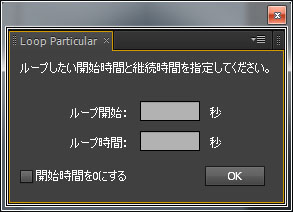
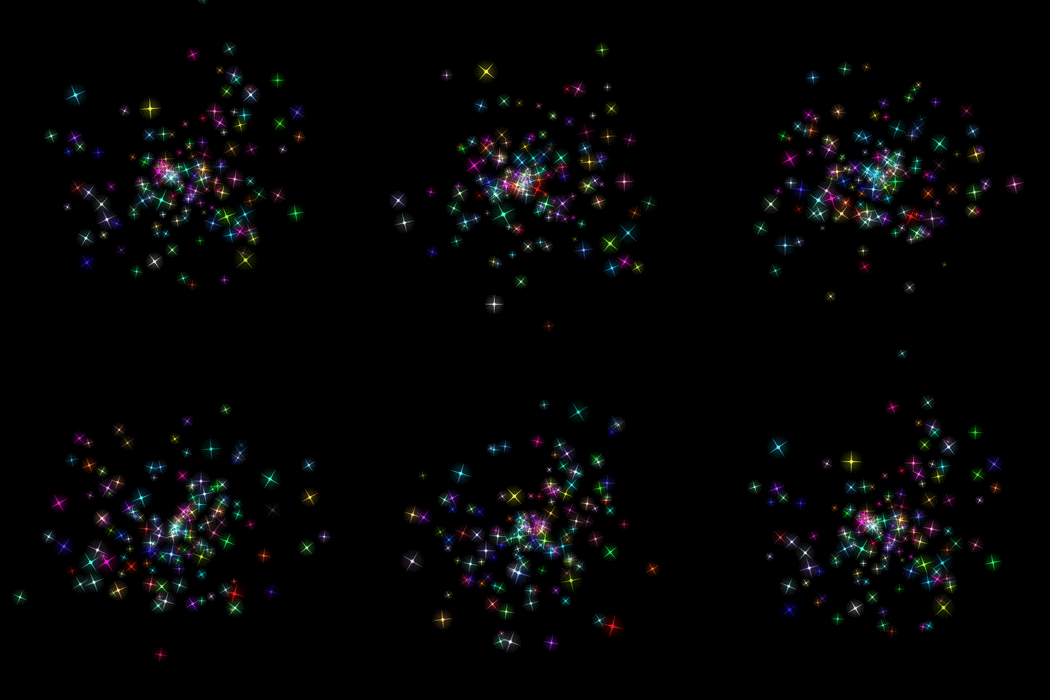
      <![CDATA[Particlarのループ素材を作るのが面倒だったので<br />
自動で作るスクリプトを作ってみました・&omega;・つ<br />
<br />
<a title="" href="//libraryofhakuto.blog.shinobi.jp/File/Sample9.jpg" target="_blank"><img alt="" src="//libraryofhakuto.blog.shinobi.jp/Img/1456747247/" /></a> <br />
<br />
<a title="" href="//libraryofhakuto.blog.shinobi.jp/File/Particle-Loop-3.gif" target="_blank"><img alt="" src="//libraryofhakuto.blog.shinobi.jp/Img/1456747259/" /></a>&nbsp;<br />
<br />
<a title="" href="http://libraryofhakuto.blog.shinobi.jp/distribution%20file" target="_self">紹介ページ</a>]]> 
    </content>
    <author>
            <name>白兎（ハクト、HAKUTO）</name>
        </author>
  </entry>
  <entry>
    <id>libraryofhakuto.blog.shinobi.jp://entry/87</id>
    <link rel="alternate" type="text/html" href="http://libraryofhakuto.blog.shinobi.jp/%E9%85%8D%E5%B8%83%E7%89%A9/%E3%83%95%E3%83%83%E3%83%86%E3%83%BC%E3%82%B8%E3%82%92%E7%AD%89%E9%96%93%E9%9A%94%E3%81%AB%E9%85%8D%E7%BD%AE%E3%81%99%E3%82%8B%E3%82%B9%E3%82%AF%E3%83%AA%E3%83%97%E3%83%88" />
    <published>2016-01-24T18:07:10+09:00</published> 
    <updated>2016-01-24T18:07:10+09:00</updated> 
    <category term="配布物" label="配布物" />
    <title>フッテージを等間隔に配置するスクリプト</title>
    <content mode="escaped" type="text/html" xml:lang="utf-8"> 
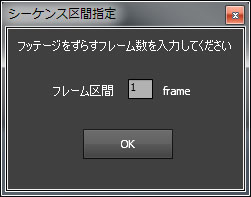
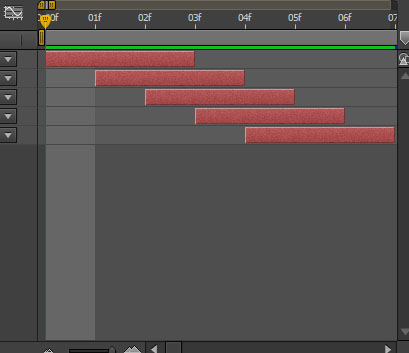
      <![CDATA[スクリプトの勉強過程で出来た産物です。<br />
<br />
1フレずつずらしたい場合等に便利かと・&omega;・!<br />
<br />
<a title="" href="http://libraryofhakuto.blog.shinobi.jp/distribution%20file" target="_self">紹介ページ</a><br />
<br />
<a title="" href="//libraryofhakuto.blog.shinobi.jp/File/Sample7.jpg" target="_blank"><img alt="" src="//libraryofhakuto.blog.shinobi.jp/Img/1453624293/" /></a> <a title="" href="//libraryofhakuto.blog.shinobi.jp/File/Sample8.jpg" target="_blank"><img alt="" src="//libraryofhakuto.blog.shinobi.jp/Img/1453624306/" /></a><br />
<br />
]]> 
    </content>
    <author>
            <name>白兎（ハクト、HAKUTO）</name>
        </author>
  </entry>
  <entry>
    <id>libraryofhakuto.blog.shinobi.jp://entry/86</id>
    <link rel="alternate" type="text/html" href="http://libraryofhakuto.blog.shinobi.jp/after%20effects%20tips/form%E3%81%A7%E7%B2%92%E5%AD%90%E5%8C%96%E3%81%97%E3%81%A6%E6%B6%88%E3%81%88%E3%82%8B%E3%83%86%E3%82%AD%E3%82%B9%E3%83%88%E3%82%92%E4%BD%9C%E3%82%8B" />
    <published>2015-12-23T19:27:19+09:00</published> 
    <updated>2015-12-23T19:27:19+09:00</updated> 
    <category term="After Effects tips" label="After Effects tips" />
    <title>Formで粒子化して消えるテキストを作る</title>
    <content mode="escaped" type="text/html" xml:lang="utf-8"> 
      <![CDATA[<iframe width="500" height="281" src="https://player.vimeo.com/video/149855176" frameborder="0" webkitallowfullscreen="" mozallowfullscreen="" allowfullscreen=""></iframe><br />
<p><a href="https://vimeo.com/149855176">Particle Text</a> from <a href="https://vimeo.com/user38125241">Hakuto</a> on <a href="https://vimeo.com">Vimeo</a>.</p><br />
<br />
<iframe width="400" height="225" src="http://www.youtube.com/embed/TlWqcyYgN4Q" frameborder="0" allowfullscreen=""></iframe><br />
<br />
昨今では在り来たりになってきたテキスト粒子化エフェクト。<br />
<br />
なので基本的な要素の説明は端折ります・&omega;・<br />
<br />
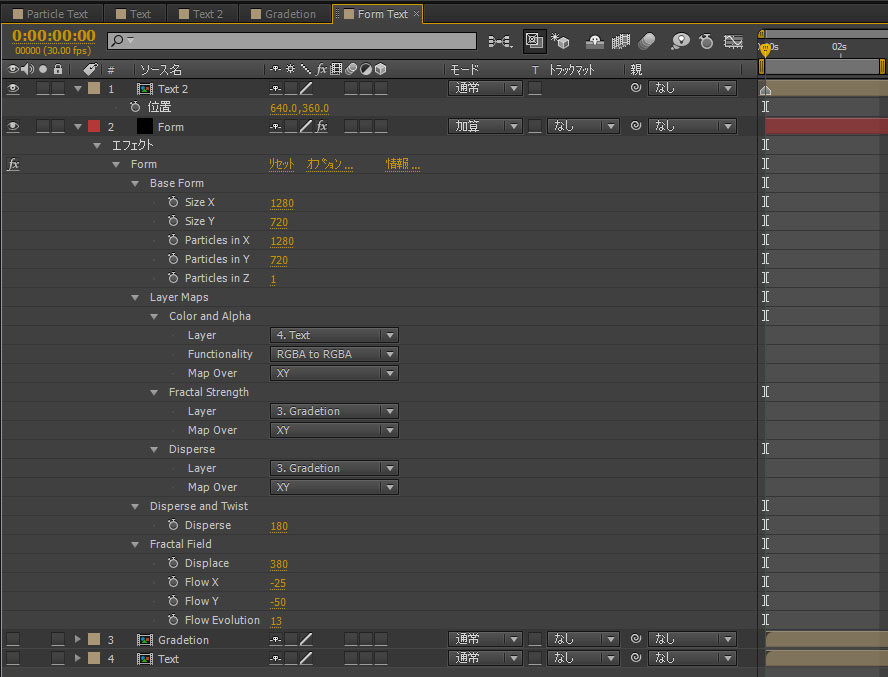
先ずはグラデーションコンポと消えるテキスト素材コンポを用意します。<br />
<br />
そしてFormエフェクトで下図のように設定します。<br />
<br />
ここでポイントになるところは"Fractal Field"の設定です。<br />
<br />
DisplaseやFlow等のパラメーターで粒子の流れを、より自然にしてあげることで<br />
<br />
違和感の無い仕上がりになります。<br />
<br />
<a title="" href="//libraryofhakuto.blog.shinobi.jp/File/SS.jpg" target="_blank"><img alt="" src="//libraryofhakuto.blog.shinobi.jp/Img/1450865983/" /></a>]]> 
    </content>
    <author>
            <name>白兎（ハクト、HAKUTO）</name>
        </author>
  </entry>
  <entry>
    <id>libraryofhakuto.blog.shinobi.jp://entry/85</id>
    <link rel="alternate" type="text/html" href="http://libraryofhakuto.blog.shinobi.jp/after%20effects%20tips/mir%E3%81%A7%E5%A4%A7%E5%9C%B0%E3%82%92%E4%BD%9C%E3%81%A3%E3%81%A6%E3%81%BF%E3%82%8B" />
    <published>2015-12-06T14:49:12+09:00</published> 
    <updated>2015-12-06T14:49:12+09:00</updated> 
    <category term="After Effects tips" label="After Effects tips" />
    <title>Mirで大地を作ってみる</title>
    <content mode="escaped" type="text/html" xml:lang="utf-8"> 
      <![CDATA[<iframe width="500" height="281" src="https://player.vimeo.com/video/147980016" frameborder="0" webkitallowfullscreen="" mozallowfullscreen="" allowfullscreen=""></iframe><br />
<p><a href="https://vimeo.com/147980016">Mir Land</a> from <a href="https://vimeo.com/user38125241">Hakuto</a> on <a href="https://vimeo.com">Vimeo</a>.</p><br />
<br />
<iframe width="400" height="225" src="http://www.youtube.com/embed/d1c-ERbrwRA" frameborder="0" allowfullscreen=""></iframe><br />
<br />
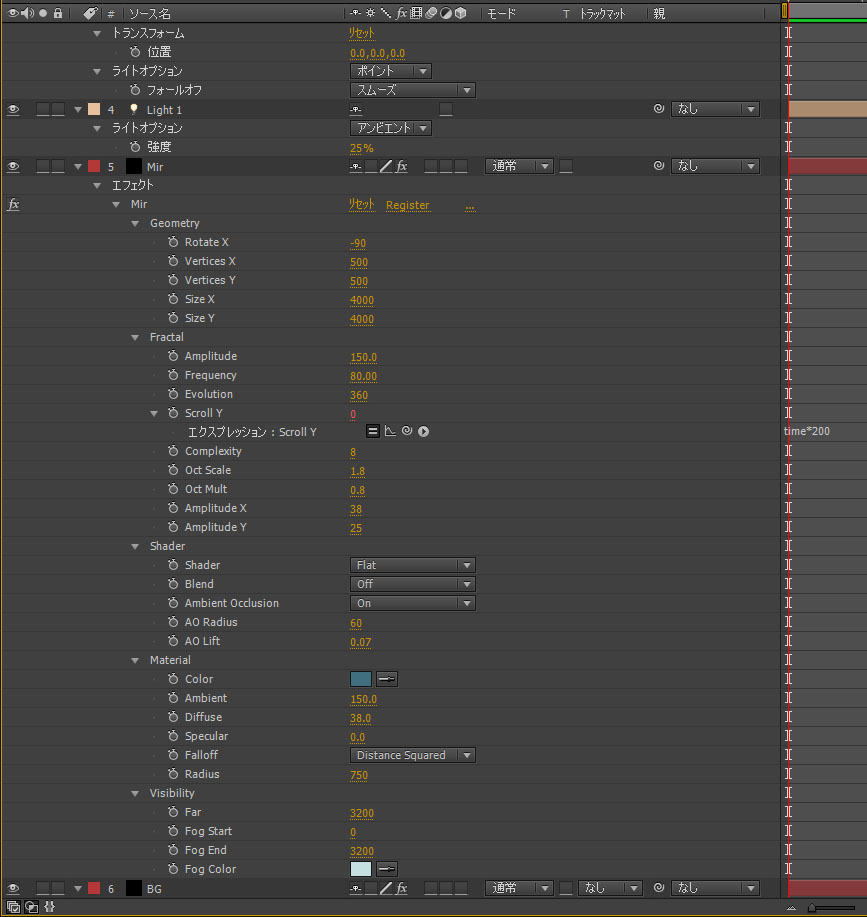
Trapcode Mirを少しでも扱えるようにするために練習で作ってみました。<br />
<br />
テクスチャーにこだわれば<br />
そこそこのクオリティーのモノを作れそうです・&omega;・<br />
<br />
以下パラメーター参考です<br />
<br />
<a title="" href="//libraryofhakuto.blog.shinobi.jp/File/ss10.jpg" target="_blank"><img alt="" src="//libraryofhakuto.blog.shinobi.jp/Img/1449380943/" /></a>]]> 
    </content>
    <author>
            <name>白兎（ハクト、HAKUTO）</name>
        </author>
  </entry>
</feed>